

Demoing Progressive Loading, Byte by Byte

We built a Progressive Loading Demo for the JPEG XL site that decodes real partial files in the browser, so you can watch what JPEG XL, JPEG, JPEGli, AVIF, and WebP can render before a download finishes.
We’ve added a new Progressive Loading Demo to the JPEG XL site.
While image compression formats are usually judged on size and quality, another metric matters just as much on slow connections: how quickly an image becomes recognizable with the absolute least amount of data delivered.
We built a demo to show exactly how that works in real time.
It lets you drag a slider to partially download an image file and watch, side by side, what JPEG XL and another format can render with limited bytes available. You can compare JPEG XL against JPEG, JPEGli, AVIF, and WebP; switch among seven photographs; and use playback to see the entire loading sequence unfold.
The point wasn’t really to declare a winner, but to make progressive delivery tangible.
Getting it running in every browser
As always with web development, there was a wrinkle… or two. It’s August 2026, and things are still complicated on the browser front.
Three years after being pulled from Chrome, JPEG XL is back. Chrome 145 shipped a Rust decoder (jxl-rs) in February 2026, and Firefox 152 added it in June, but both are behind an off-by-default flag (Chrome will be out from behind a flag in version 155). Only Safari, which shipped support in 2023, decodes JXL without user intervention. But Safari renders the finished image and skips the progressive passes, completely missing the point of the demo. So, in short, no browser currently does it all. That meant the only way to get all of them on the same page was to stop relying on any of them.
So we set out to do the decoding ourselves: jxl-rs wrapped in WebAssembly, feeding a buffer we could truncate as needed and producing byte-for-byte the same partial frame, no matter the browser. We started with jxl-oxide, the more mature Rust decoder. We weren’t super jazzed with the results. The community suggested we move to jxl-rs instead, since so much optimization effort had been poured into it for Chrome and Firefox. That effort to make progressive decoding fast and correct is exactly the effort a progressive-loading demo needs, at least until it’s fully supported in browsers.
The payoff is that everyone gets to preview it regardless of browser. The downside is that it will be slower than native solutions, but it is more than adequate on most hardware.
AI Use
This took about a week to build and refine, and it certainly wouldn’t have been doable by us alone as a design shop without using AI. We had a very clear vision of the interface, so that part was easy. The harder part was turning that concept into a demo that behaved honestly with partial image data.
Getting jxl-rs wrapped in WASM without AI would have been a non-starter. It helped us move through the unfamiliar technical work, from streaming partial bytes into the decoder to updating the preview without freezing the page. It was especially useful for investigating edge cases that only appeared once we started scrubbing back and forth through a download.
Having the AI test across browsers automatically was also incredibly time-saving. I’d get it working in Chrome and break Firefox, fix Firefox and break Safari. Having the AI repeatedly test, report what changed, and help narrow down the differences was awesome.
It made it possible for a small design team to spend more time refining design choices and less time getting stuck in implementation details. We tested and tweaked design changes far more quickly than we otherwise would have. We could try new interactions, controls, layouts, or loading behaviours, see them running in the browser, and immediately decide whether they made the demo clearer.
What the demo shows
It was important to us for the demo to use actual partial files rather than pre-rendered animations. Move the slider and each pane is decoded from the bytes that would be available at that point in a real download.
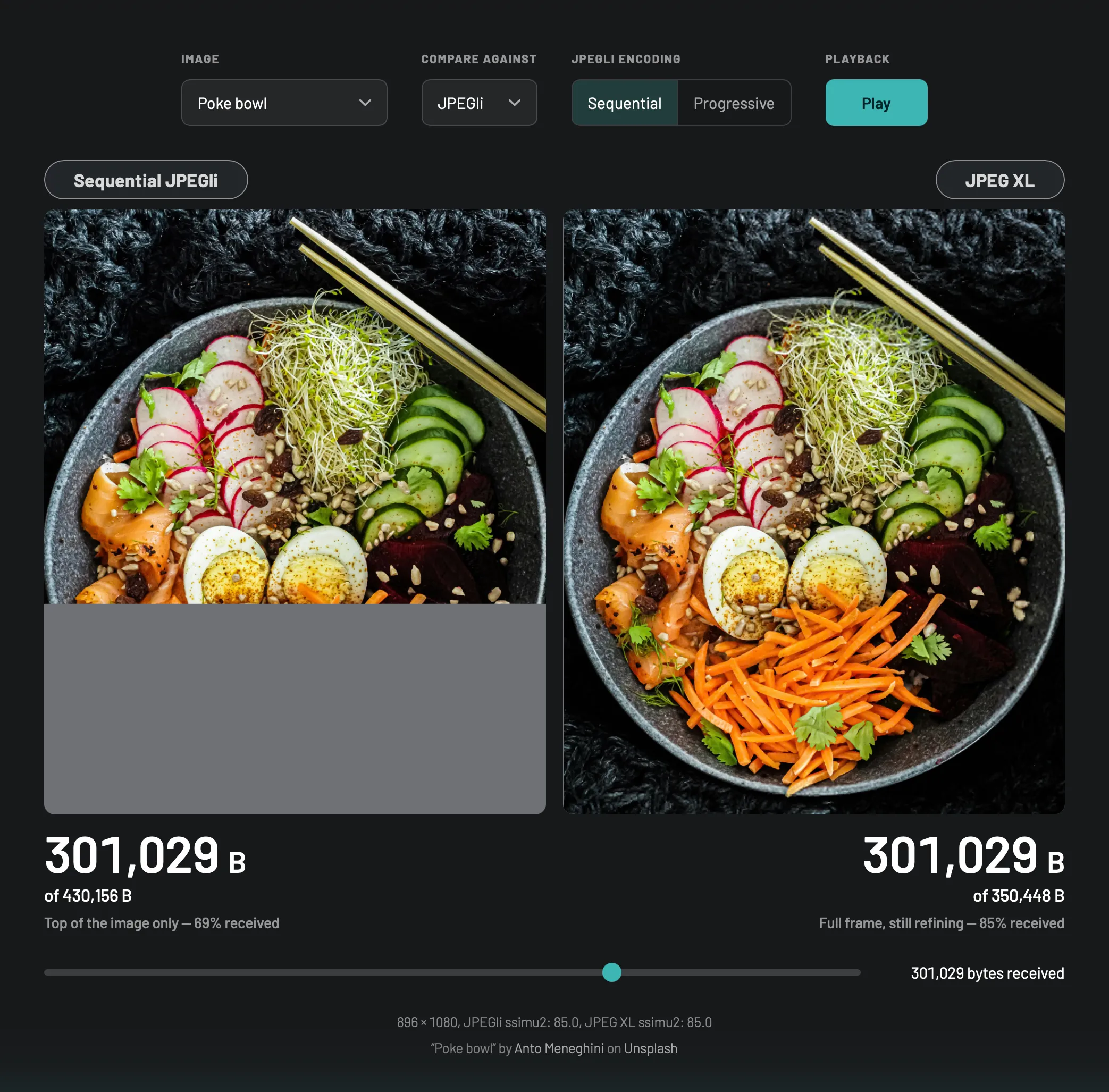
On the JPEG XL side, after very few bytes, the image appears as a coarse full-frame preview before successive bytes continue refining it. On the comparison side, the result depends on both the selected format and its encoding mode:
- Sequential JPEG reveals scanlines from the top downward.
- Progressive JPEG and JPEGli can deliver increasingly refined passes. JPEGli files are also significantly smaller than old-school JPEGs.
- Progressive AVIF’s layered encoding can expose a very low-resolution base layer first, though what browsers visibly render during loading still varies. We’re allowing the browser to render it natively: you get the preview in Chrome, but nothing in Safari.
- Poor WebP doesn’t have a progressive mode.
Each source pair is encoded to a comparable visual-fidelity target, approximately 85 in this case, and the demo reports file size and SSIMULACRA2 scores alongside the image. (NB: WebP often couldn’t hit a ssimu2 score of 85, even at quality 100).
Try it yourself
Open the Progressive Loading Demo, select an image, pick a comparison format, and hit Play, or drag the slider through the download.
Watch for the moment when an image first becomes useful, not merely when it is complete. There are still millions, perhaps billions, of people in the world who would appreciate a smaller file being delivered and an image appearing as quickly as possible.
The JPEG XL images were compressed with cjxl 0.12 and the AVIF images with avifenc 1.4.2 (aom 3.14.1).