

We Built a Decode Speed Test, and Safari Looked Slow. Was It Us?

Our new Decode Speed Test for the JPEG XL site times how fast your browser turns image files into pixels. Safari came out slower on almost everything, so before blaming Apple, we went looking for a bug in our own code.
We’ve added a new Decode Speed Test to the JPEG XL site.
File size gets most of the attention, but once an image has downloaded, your device still has to decode it, turning it into displayable pixels. On a fast connection, that decode step can rival the download.
The test measures exactly that, on your device, in your browser. It was inspired by Jon Sneyers’ browser decode speed test. We wanted to take the idea further with more formats, more encoder settings, and a look at JPEG XL both natively and in our WebAssembly jxl-rs decoder.
When we ran it in Safari, something caught our eye.
How the test works
There are five photographs, each 2400 pixels on their long side. Each one comes as its lossless PNG master plus 18 encodes: JPEG, JPEGli, WebP, AVIF at 8, 10, and 12 bits, five lossy and five lossless JPEG XL files at different --faster_decoding levels, and lossless JPEG XL transcodes of both JPEGs. We also had to fix the PNG masters: a bug in Affinity when saving scaled images left four of the five with a nearly invisible, partly transparent border. That gave the WebP, AVIF, and JPEG XL files an alpha channel the JPEGs didn’t have, so we removed it and re-encoded everything.
We worked to measure only the decode:
- Every file is downloaded before any timing starts, so your connection doesn’t skew the results.
- Each file gets one untimed warm-up, then 5 or 21 decodes in a row. We report the median, and speed in megapixels per second.
- Each native decode uses a brand-new image and a brand-new blob URL. Later you’ll see that detail matters.
- If your browser can decode JPEG XL natively, you can also time our self-hosted
jxl-rsWebAssembly decoder. It’s off by default, because WebAssembly is slower and more than triples the run time. Browsers without native support always use the WebAssembly decoder.
The chart ranks every file from fastest to slowest. For JPEG XL, a thin WebAssembly bar sits on top of the native bar, so you can compare the two at a glance.
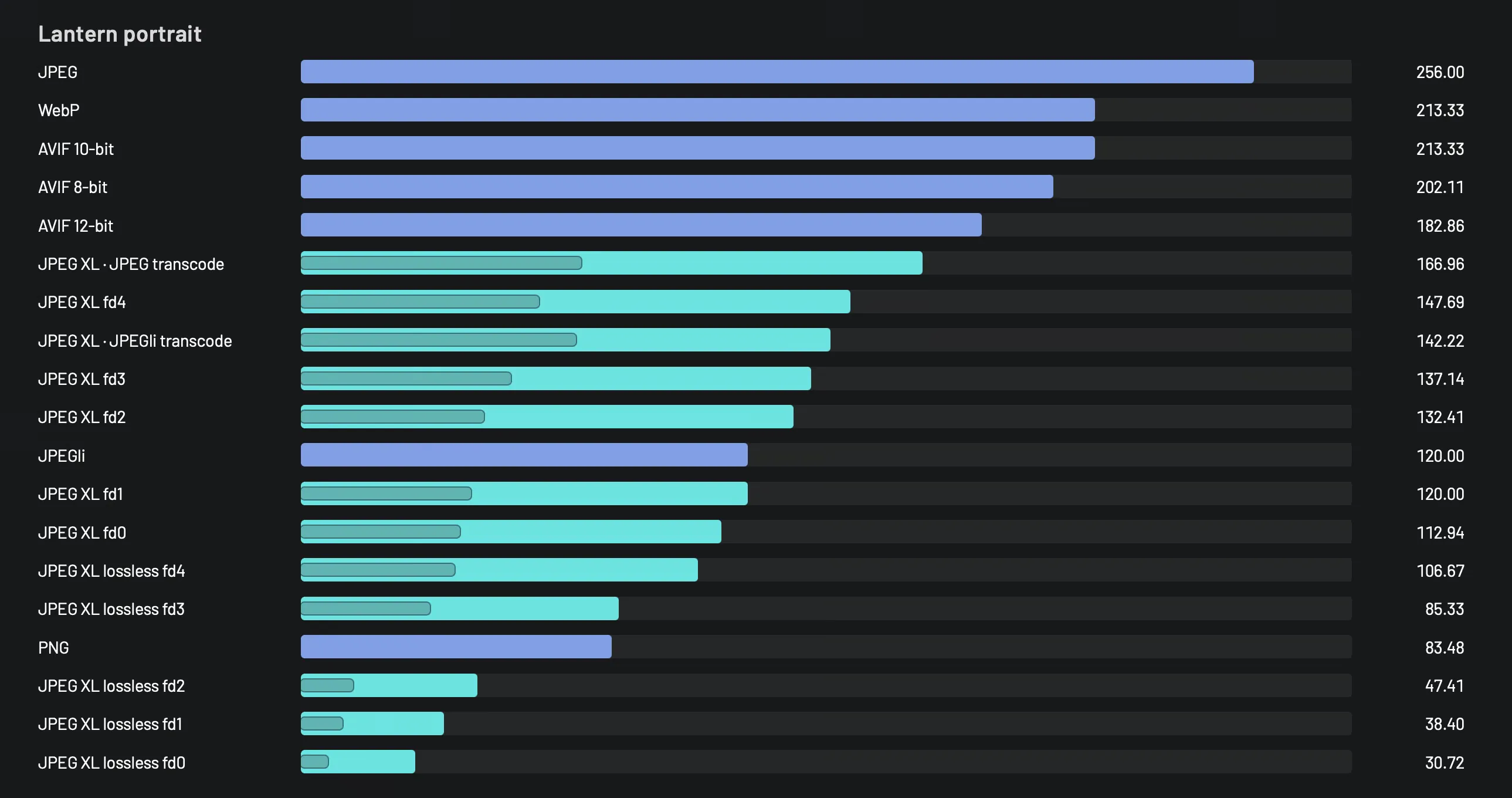
Safari 27.2 on the Lantern portrait. Higher is faster.
Something odd
On my M2 Max, Safari came out slower than Chrome on almost everything: roughly twice as slow on JPEG and PNG, and slower on JPEG XL too. Some of that could be a real difference between browsers. But when one browser is consistently behind across nearly every format, the first suspect should be your own code.
Browsers do a lot behind the scenes when you hand them an image, and our timing wraps all of it. Perhaps Safari was spending time loading the blob URL rather than decoding, or making our code wait for a screen refresh. Any of those would make Safari look slow for reasons that have nothing to do with its decoders.
Checking our own work first
So we built a small diagnostic page that splits the test’s timing into its parts using a single image. For each format, it measures:
- the complete call, exactly as the speed test times it;
- how long the bytes take to load from the blob URL;
- the decode on its own, after loading;
- a second decode of the same URL.
We also ran a 1×1-pixel image through the same path to expose fixed costs per call.
In Safari, the fixed cost per call was 0–1 ms, and loading from the blob URL took 0–2 ms. In both browsers, nearly all of the time went to decoding.
The last measurement showed why that fresh URL matters: a second decode of the same URL took 0 ms. Browsers cache decoded pixels for URLs they’ve already seen.
What the data shows
Here’s the decode alone on the Lantern portrait (1600 × 2400), on the same Mac, in Safari 27.2 and Chrome 157. Chrome has decoded JPEG XL natively since version 155.
| Format | Safari 27.2 | Chrome 157 | Safari ÷ Chrome |
|---|---|---|---|
| JPEG | 15 ms | 5.7 ms | 2.6× |
| JPEGli | 32 ms | 22.6 ms | 1.4× |
| PNG | 46 ms | 22.9 ms | 2.0× |
| WebP | 18 ms | 14.0 ms | 1.3× |
| AVIF 8-bit | 19 ms | 9.9 ms | 1.9× |
| AVIF 12-bit | 21 ms | 24.6 ms | 0.9× |
| JPEG XL lossy (fd0) | 34 ms | 23.0 ms | 1.5× |
| JPEG XL lossless (fd0) | 125 ms | 59.8 ms | 2.1× |
So Safari really is slower at most formats, and our tool is reporting it accurately. The difference comes down to whose decoders are doing the work. Safari hands every format to Apple’s system image framework. Chrome ships its own decoders, including jxl-rs for JPEG XL. On this Mac, Apple’s decoders are noticeably slower for JPEG, PNG, and JPEG XL.
It isn’t a clean sweep for Chrome, though. Safari decoded 12-bit AVIF faster than Chrome on all five photos. On the Courtyard café photo, Safari took 31 ms, while Chrome took 60.5 ms.
Bit depth explains it. Going from 8-bit to 12-bit AVIF, Chrome slowed down by two to three times, while Safari slowed by less than half that. Our guess is that Chrome’s high bit depth AVIF path is far less optimized than its 8-bit one.
Then we took a closer look at JPEG
Something in Chrome’s own numbers didn’t add up. Our plain JPEG decoded in 5.7 ms, but the JPEGli file took 22.6 ms. Both are JPEGs, handled by the same decoder in Chrome, yet one was four times slower. Safari’s gap also shrank from 2.6× on JPEG to 1.4× on JPEGli. That hinted that Chrome had a shortcut for our plain JPEG, rather than Safari being uniformly slow.
The two files turned out to be quite different. The plain JPEG is baseline, which means it’s stored in a single pass. Its colour is also stored with a quarter of the pixels (4:2:0 chroma subsampling). The JPEGli file is progressive, stored in several passes that refine the image, with full-resolution colour (4:4:4).
Decoding a JPEG happens in two stages. First, the compressed data is unpacked into separate brightness and colour planes. Then the colour planes are scaled up to full size and everything is converted to RGB. Chrome can stop after the first stage and leave the second to the GPU when the image is drawn, outside our timer. Apple’s framework always produces a finished RGB bitmap, so Safari’s time includes both stages.
To test that, we encoded the Lantern portrait four ways with libjpeg-turbo 3.2.1 at quality 90: baseline or progressive, each with 4:2:0 or 4:4:4 colour. In the same Safari 27.2 and Chrome 157, we timed decode() as before, and also createImageBitmap, which hands back finished RGB pixels in both browsers. Each result is the median of 21 decodes.
| cjpeg q90 | Safari decode() | Chrome decode() | Gap | Safari RGB | Chrome RGB | Gap |
|---|---|---|---|---|---|---|
| Baseline 4:2:0 | 14 ms | 5.6 ms | 2.5× | 11 ms | 7.6 ms | 1.4× |
| Baseline 4:4:4 | 16 ms | 9.1 ms | 1.8× | 13 ms | 10.0 ms | 1.3× |
| Progressive 4:2:0 | 25 ms | 14.8 ms | 1.7× | 22 ms | 17.0 ms | 1.3× |
| Progressive 4:4:4 | 34 ms | 23.9 ms | 1.4× | 32 ms | 24.5 ms | 1.3× |
A few things stand out:
- When both browsers produce finished RGB pixels, Safari is a steady 1.3–1.4× slower across all four files. The big gap only appears with
decode(), and it’s largest for baseline 4:2:0, which is exactly how our plain test JPEG was made. - Asking Chrome for RGB costs it an extra 2.0–2.2 ms on the 4:2:0 files, where the colour has to be scaled up, but less than a millisecond on the 4:4:4 ones. That fits a shortcut that mostly skips the upscaling step.
- Safari was 2–3 ms faster with
createImageBitmapthan withdecode()on every file. We didn’t expect that. It means part of thedecode()gap is on Safari’s side, too. - Progressive JPEGs are expensive everywhere. They took about 2.6× longer than baseline in Chrome and 1.8–2.1× longer in Safari. Our JPEGli file decoded slightly faster than the libjpeg-turbo progressive 4:4:4 file (21.7 vs 23.9 ms in Chrome, 32 vs 34 ms in Safari). So its slower times come from being progressive with full colour, not from JPEGli itself.
So the JPEG row in our first table needs an asterisk. With finished RGB pixels from both browsers, the gap on a baseline 4:2:0 JPEG drops from 2.5× to 1.4×. Roughly half of that drop comes from Chrome postponing colour conversion until the image is drawn, which a decode() timer can’t see. The other half comes from Safari’s decode() being slower than its own createImageBitmap. Chrome’s shortcut is a genuine advantage when it draws with the GPU, but it isn’t a like-for-like decode. PNG doesn’t have this caveat, because it’s RGB from the start, so its 2.0× gap stands. Lossy WebP and AVIF also store brightness and colour separately, so the same shortcut may apply to them, but we haven’t dug into those yet.
A few more things we noticed
Native JPEG XL is much faster than WebAssembly. In Chrome, native jxl-rs decoded the lossy Courtyard café file (fd0) in about 30 ms. Our WebAssembly build of the same library took about 107 ms, roughly three and a half times slower. Across the five photos, WebAssembly was 3.5–4.3× slower on lossy files and 5–8× slower on lossless ones.
Safari runs WebAssembly more slowly as well. Our WebAssembly decoder is identical in both browsers, yet Safari ran it 10–60% slower on lossy files and JPEG transcodes. On lossless files, the two browsers were within about 10% of each other. That part has nothing to do with Apple’s image framework and comes from the browser’s JavaScript engine.
Safari’s timer counts whole milliseconds. Chrome reports times to a tenth of a millisecond, while Safari rounds to the nearest millisecond, so close results in Safari are a little blurrier. That doesn’t explain a 2× gap.
These are measurements from one machine and two browsers, taken through the same APIs a web page uses. They aren’t isolated codec benchmarks, and your results will differ. That’s the point of running the test yourself.
Try it yourself
Open the Decode Speed Test, press Run, and keep the tab visible while it works. It takes under a minute without WebAssembly, plus the time to download about 140 MB of test images the first time. Then try the same test in another browser, and hover over the bars to see how much each decoder differs on your machine.
The test images were encoded with cjxl 0.12, avifenc 1.4.2 (aom 3.15.1), cwebp 1.6.0, cjpegli, and Pillow 12.1.1. The full settings for each file are listed in the test’s results table.
Updated November 14, 2026: We re-ran the speed test and the JPEG experiment in Safari 27.2 and Chrome 157, and updated the tables, the chart, and the figures in the text. The diagnostic page results are from our original September runs.